Grayscale Transition Without Saturation in URP Shader Graph
Playing with Shader Graph, I wanted to build a grayscale transition by hand. Simple goal: take one texture, slide between full color and black-and-white with a single slider. Could have used the Saturation node directly, but I wanted to see how it works underneath.
Problem
Required behavior:
- One texture input.
- Slider at
0: fully grayscale. - Slider at
1: original color. - Smooth interpolation in between.
Saturation node does this out of the box. Still wanted to confirm how grayscale is actually constructed.
Solution
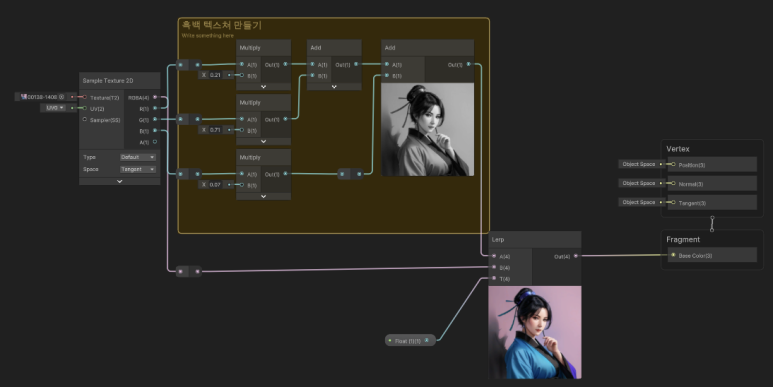
Two steps:
- Convert original color to a grayscale value.
- Lerp between grayscale and original.
Grayscale isn't equal-weight RGB. Human perception weights channels differently for a natural-looking result:
gray = R * 0.21 + G * 0.71 + B * 0.07
Spread that gray across all three RGB channels for a grayscale color. Then apply Lerp(A, B, T):
A: grayscaleB: original colorT: 0–1 slider value
In shader terms, one line:
result = lerp(grayscaleColor, originalColor, t)
Why this way
The upside is simple debugging:
- Grayscale conversion wrong?
- Interpolation value wrong?
- Final output wrong?
Each part isolates cleanly. Using the Saturation node directly is faster, but building it once makes "grayscale transition = grayscale generation + interpolation" stick clearly.
Notes
The lasting takeaway is a thinking pattern, not a technique. For simple effects like this, understanding "transform the original into some intermediate form, then blend the two" outlasts memorizing a node name.
When building similar effects:
- First create the intermediate representation. Here: grayscale.
- Blend it with the original via Lerp.
- Attach a slider or mask for control range.